

Multiple CPMS
If you want to send messages from your chargers to more than one CPMS (Charge Point Management System), you need a Lab.
1. Configure Charger Profiles
Section titled “1. Configure Charger Profiles”Create a Charger Profile for each CPMS and connect all of them to the same Lab.
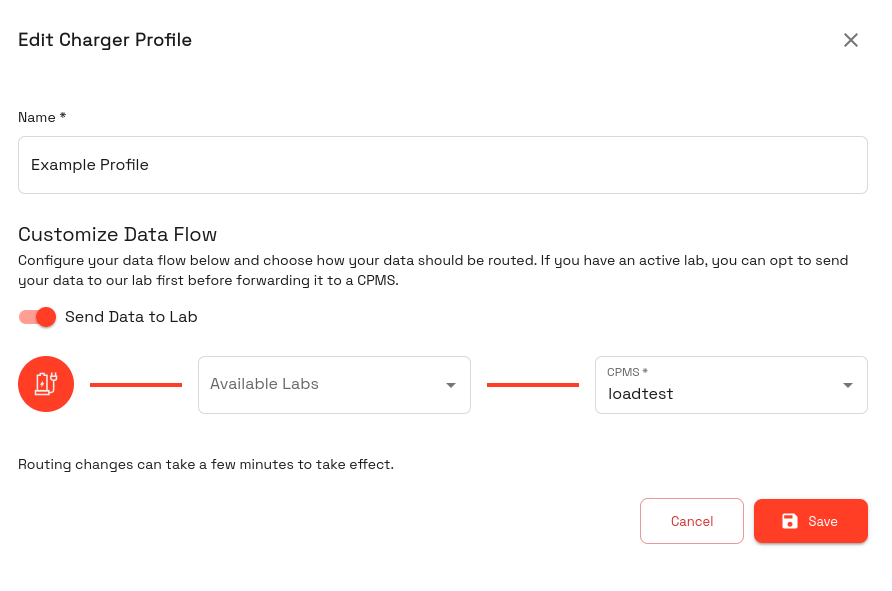
2. Configure the Lab Flow
Section titled “2. Configure the Lab Flow”Connect the “From Charger” Output of the “Exolink Connect - Input” component to all the CPMS Inputs of the “Exolink Connect - Output” component.
The CPMS Inputs can be identified by the tooltip which contains the ID of the CPMS. To find out the ID of a CPMS, view the ID column in the CPMS list (default hidden).
2.1. Important Governance
Section titled “2.1. Important Governance”If you connect multiple CPMS, some governance is needed to avoid unexpected behavior.
Make sure that the chargers only ever receive one CALLRESULT by adding either a “Switch” or “Code” component between “From CPMS” and “To Charger”. Implement your custom logic to decide which CPMS is allowed to send its answer to the chargers.
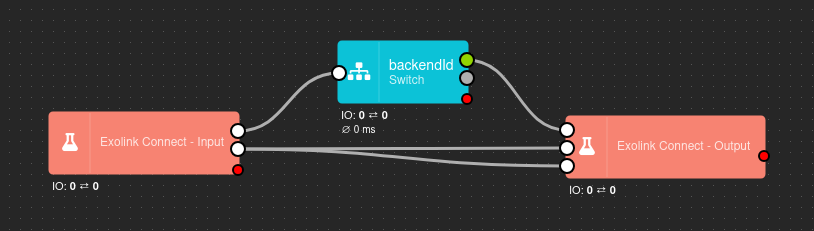 Example for a multi CPMS Lab Flow
2.2. Example: only the primary CPMS answers
Section titled “2.2. Example: only the primary CPMS answers”Put a Code component between From CPMS and To Charger. Replace 12 with the ID of your primary CPMS:
const PRIMARY_CPMS = 12;
// Answers from other CPMS are dropped – the primary already answers the chargerif ((data.msgType === 'CALLRESULT' || data.msgType === 'CALLERROR') && data.backendId !== PRIMARY_CPMS) {    return;}send(0, data);
Requests from the other CPMS (e.g. RemoteStartTransaction) and connection events still reach the charger. If a secondary CPMS should only observe, also drop its requests – or allow only the actions it needs:
const PRIMARY_CPMS = 12;const ALLOWED_FROM_SECONDARY = ['GetConfiguration', 'TriggerMessage'];
if (data.backendId !== PRIMARY_CPMS && data.msgType !== 'event') {    if (data.msgType !== 'CALL' || !ALLOWED_FROM_SECONDARY.includes(data.action)) {        return;    }}send(0, data);
backendId contains the ID of the CPMS a message came from. More about writing such rules: Code component.