

What is the Lab?
The Lab is a visual flow editor that sits between your chargers and your CPMS (Charge Point Management System). Every OCPP message and connection event passes through your Lab flow, where you can inspect, filter, modify, reroute or answer it, and connect it to other systems over HTTP, MQTT, e-mail, SFTP, S3 or MySQL.
It fast-tracks experimentation, development of tailored e-mobility applications and the deployment of new use cases.
🧭 – What you can do with a Lab
Section titled “🧭 – What you can do with a Lab”- Look at live traffic – print every OCPP message in JSON format while your chargers are talking to the CPMS.
- Send messages to more than one CPMS – one charger, several CPMS, with your own rules about who may control the charger. See Multiple CPMS.
- Change messages on the way – fix a non-compliant charger or CPMS, e.g. rewrite an
idTag, drop a vendor-specificDataTransferor change the heartbeat interval. - Integrate other systems – forward meter values to your data platform, call a webhook when a session starts, or start a charge from an HTTP request.
- Answer messages yourself – reply to a charger directly from the Lab without involving a CPMS.
📚 – Where to start
Section titled “📚 – Where to start”- How the Lab works – how messages enter and leave your flow, the message format, connection events and variables.
- Components – the most common components and their settings.
- Code component – write your own logic in JavaScript.
- Examples – ready-to-build flows for common use cases.
🧪 – Example Flows
Section titled “🧪 – Example Flows”View OCPP messages
Section titled “View OCPP messages”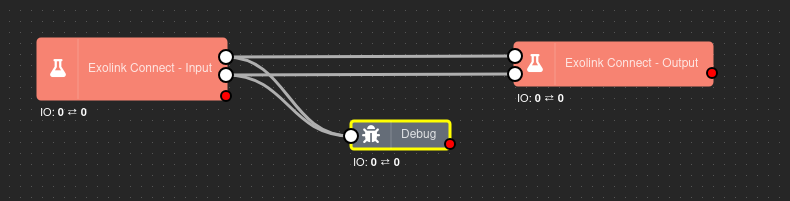 A Lab flow to view OCPP messages in JSON format
Publishing OCPP messages via MQTT
Section titled “Publishing OCPP messages via MQTT”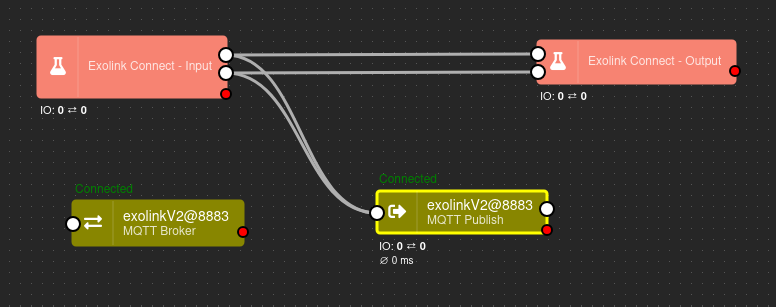 A Lab flow to view OCPP messages being send to an MQTT broker
More flows, step by step: Examples.
✉️ – Support
Section titled “✉️ – Support”We will be happy to help you 😊
Section titled “We will be happy to help you 😊”We get back to you as soon as possible.